> For the complete documentation index, see [llms.txt](https://m0uk4.gitbook.io/notebooks/llms.txt). Markdown versions of documentation pages are available by appending `.md` to page URLs; this page is available as [Markdown](https://m0uk4.gitbook.io/notebooks/honey/python-notes/json-wen-jian-du-xie.md).
# json文件读写
#### 读
```python
with open("C:\\Users\\daiyifan\\pclady_wiki\\pclady_wiki\\answers1.json",
"r",
encoding="utf-8") as js1:
url1=json.load(js1)
```
#### 写
```python
with open("C:\\Users\\daiyifan\\pclady_wiki\\pclady_wiki\\answers.json","w",encoding="utf-8") as js3:
json.dump(url_sum,js3)#只能写入字典
f.write('\n')#可以换行
```
#### replace
经过replace的字符串不改变本身的值,而作为值返回。
```python
str=str.repalce(old,new[,max])#max指最多匹配次数
```
#### 正则表达式
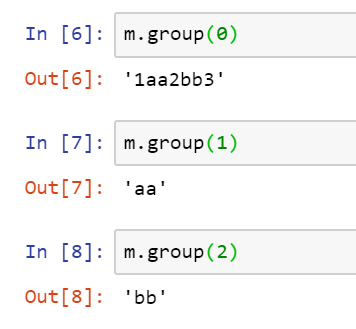
re模块正则表达式匹配的结果会返回为一个对象,可以通过`group`方法来查看该对象的值。`group(0)`为全部匹配的值,`group(1)`为第一次匹配()中的值如:
re模块的`sub`的替换结果可以用函数表示
详见[re.sub使用替换函数](/notebooks/mouka/python/python-tricks/re_sub_function.md)